Printfree.com Home  
Site Map
& Guide
 
Tips on
Printing

Privacy
 
Greeting
Cards

 
Holidays 
 
Graduation
2008
Page 01
Page 02
 
Fathers Day
Cards 01
Cards 02
Cards 03
Cards 04
 
Office
Forms &
Flyers

Calendars
Monthly
Customizable
Yearly
Picture 2008
School
Items
Signs
Business
Cards
   
Coloring
Book Pages

Animals
Machinery
Plants
Customizable
Pictures
and Prints

 
Feedback

About Us
 
Terms
of Use


Privacy
Policy


Horizontal Half Fold Customizable Greeting Cards
Tips and Directions for Understanding 2 Sided Printing.
from Printfree.com
Please scroll down on this page to view all of our content and printable items.

Printable Greeting Card Section Directory

General Greeting Categories

Birthday

Current Holiday Cards

Main Greetings Description Page
Invitations
Graduation Page 01 Page 02
All Purpose Cards
Kids Coloring Cards
Party Signs and Flyers
Animal Lovers (animal themed images) 
Monthly and Seasonal Themed
Miscellaneous and Text
Assorted
Our Complete Holiday List
 
Mothers Day
Page 01  Page 02  Page 03  Page 04 
 
Fathers Day 
Page 01  Page 02  Page 03  Page 04
 
Graduations Page 01  Page 02 
 
summer parties

Friends and Family

Help and Directions

Bridal and Wedding Page 01 Page 02
New Baby Page 01 Page 02
Love and Friendship
Get Well and Sympathy
Thank You
Tips on Printing
What is a plain envelope card?
How to fold plain envelope cards
Making a quarter fold envelope
Removing the web address URL
before printing our items.
 
 
Half-Fold Card Links
Links to the Half-fold Text Pages.
Black Blue  Brown  Gray  Green 
Pink  Purple  Red  Turquoise
 
 
Half fold cards are a two step process.
For more info read:
Half fold card printing
 

Text Description
The Descriptions and images below have been added to help you
figure out how your printer works. If you understand this, it will help you
when printing 2 sided pages, as is required with our half fold cards.
These are the 2 most common types of inkjet printers.
( Consult your owners manual for your printer to get exact details )    

 
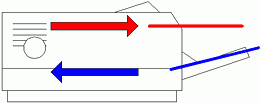
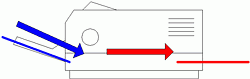
Blue represents unprinted paper
Red represents printed page
 
Which style of printer do you have?

Typical Front Feed Printer (inkjet)  

 
The typical front feed printer pulls
the blank paper (blue) from a tray
on the front at the bottom .
 
This printer wraps the paper around
before it prints on it, so it prints on
what was the face down side of the
blank sheet when it was resting
on the bottom tray.
 
To print on the back side of this
page, you would place the already
printed side face up in the bottom tray.


Typical Rear Feed Printer (inkjet)

 
The typical rear feed printer  pulls
the blank paper (blue) from a tray
at the back of the printer.
 
The paper passes straight through
on this type of printer, so it prints on
what was the face up side of the
blank sheet when it was rest
in the back tray.
 
To print on the back side of this
page, you would place the already
printed side face down in the back tray.
 

Both of these printers will print the screen on your computer from top to bottom.
If you watch the printer, you'll see the top of the page coming out first.
The end of the paper that faces the printer in the feed tray, will be the first end
to come out, and will print as the top of the page. 
 

How our half fold cards are laid out.
 

We have a variety of images for the outside of the cards,
picture or greeting on the front, small logo on the back.
These page are all laid out so that the main card image is right side up and
you won't have to stand on your head to view it prior to printing. 
 
We have 9 text pages for these cards that us the same format as all
of our other customizable items. These are in 9 different colors, so
you can choose the color of text that you want for the inside of the card.
Black, Blue, Brown, Gray, Green, Pink, Purple, Red, & Turquoise.
 
You want the text to end up on the opposite side of our logo, on
your finished card. Read carefully the following steps.
 
If you print the inside text first, feed the bottom end
of the text page into the printer when you
print the image on the other side.

(We prefer to print the text first in order to check spelling, grammar, and print
quality. This will save you a little ink if there is a mistake.)
 
If you print the outside image of the card first, feed
the main image or picture end into the printer first
when you print the text on the other side.


We have a good low ink usage card to practice with on our
first page of half fold cards. 
It uses black ink and will work fine on cheap paper for practice.

It also may help to use a pencil to make a small x on the
practice card, to figure out the orientation of your printer.
 

Be sure to read tips on printing to learn how to keep from printing
the url, (web address) and page numbers on the top and bottom of your cards.